Insight
Using ChatGPT to Convert Bank Statements: What to Watch For

Anson

It's the end of the day, you're mid-reconciliation, and the bank feed picks now to stop pulling. The statement PDF is sitting right there in the client folder. So you do the obvious thing: drop it into ChatGPT and ask for the transactions as a table. A few seconds later you have clean rows back, date and description and amount all lined up, and it looks perfect.
That appeal is real. You can use ChatGPT to convert a bank statement without installing anything, and for a single statement you only need once, it mostly works.
This piece is about where that holds and where it doesn't. It isn't an argument that you should never touch an AI tool. It's the plain version: what ChatGPT does well with a statement, the one thing it does that you won't catch by looking, and why "looks perfect" is exactly the problem when the data belongs to a client.
What ChatGPT actually does well with a statement
Start with the fair part, because there's a lot of it. ChatGPT reads a PDF fine. Hand it a normal digital bank statement and ask for the transactions, and it pulls the date, the description, and the amount and hands them back as a table you can paste into a spreadsheet. No setup, no new software, and no extra cost if you already pay for it.
For a one-off, that's useful. Say you're curious how much you spent on fuel last quarter, or you want a quick look at one month of one account. Paste, ask, read the answer. Done in the time it takes to make coffee.
It's also flexible in a way a dedicated tool isn't. It hasn't been set up ahead of time to read your specific bank's layout, and it doesn't need to be. You can ask it to drop the running balance, combine two description columns, or flag anything over five hundred dollars, in plain English, and it'll have a go. That's a real convenience when you're poking at one statement and don't want to fight a settings panel.
So none of this is a setup to tell you the tool is useless. For your own single statement, when nothing rides on the result, reaching for ChatGPT is a reasonable move. The trouble starts when the statement isn't yours, and when one isn't dozens.
The catch when ChatGPT converts a bank statement
Here's the part you won't see by skimming the output. When ChatGPT converts a bank statement, it isn't reading the numbers the way a calculator reads them. It's predicting what the next character probably is, one position at a time.
Most of the time the prediction matches the page. Now and then it doesn't, and a figure like 1,240.00 comes back as 1,420.00, or a single digit transposes somewhere in a long column.
The reason this matters isn't that it happens often. It's that the wrong number looks exactly as plausible as the right one. A transposed figure doesn't show up in red.
It sits in the column looking like every other row, correctly formatted, perfectly reasonable for that account. There's no asterisk, no flag, nothing that says "check this one." The only way to catch it is to read the extracted row against the source line on the PDF, every row, by eye.
There's a second version of the same problem. Run the same statement through twice and you can get two slightly different answers. Not wildly different, just different enough that you can't fully rely on the first pass matching the second.
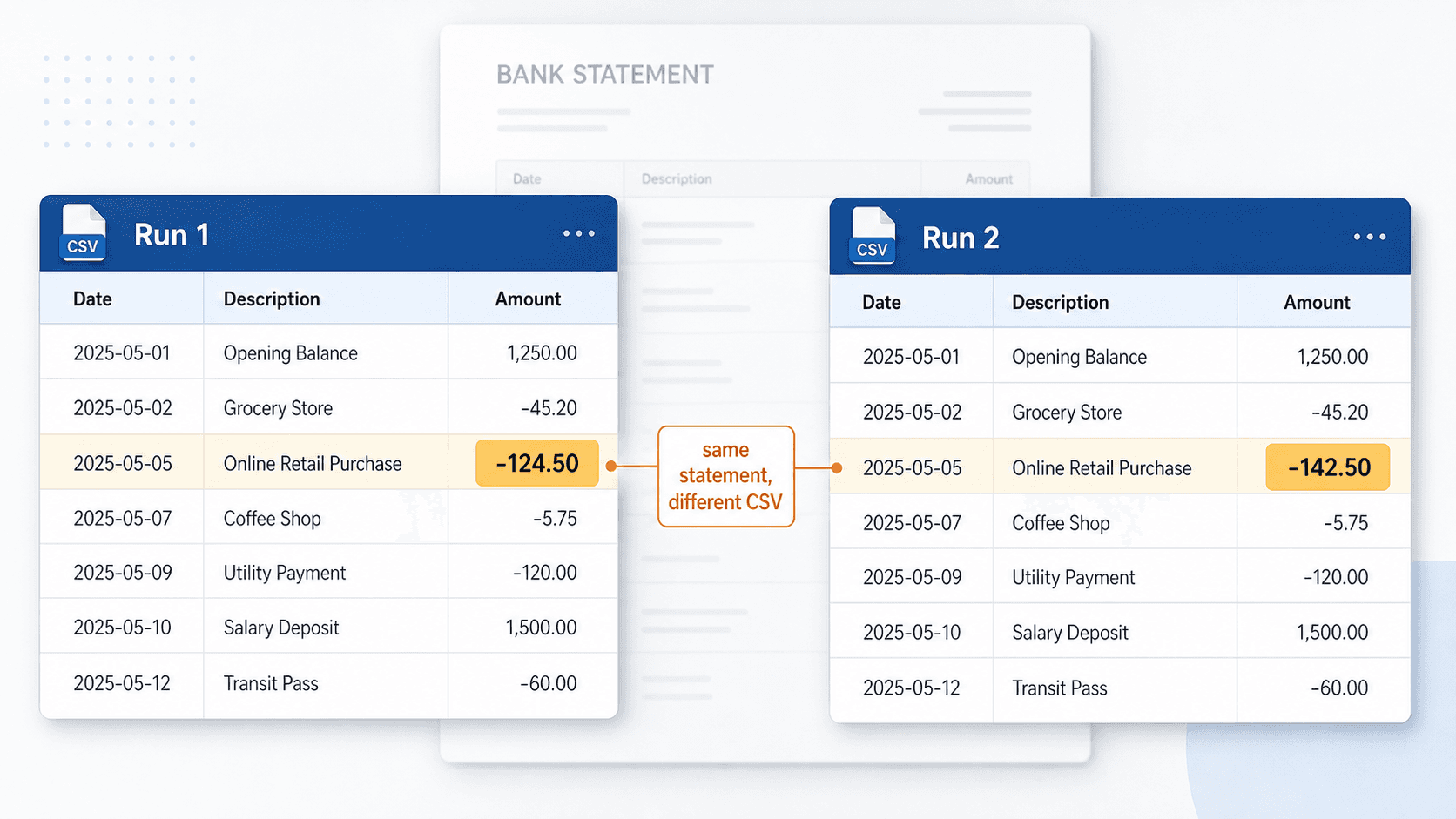
OpenAI's own usage guidance points the same direction: check the output, keep a person in the loop on accuracy. The company that makes the tool is telling you not to take the result on faith.
A rule-based converter behaves differently here, and the difference is the whole point. It follows the same fixed steps every time, so the same statement produces the same CSV on every run. If a row is wrong, it's wrong the same way each time, which means you can find it and fix the rule behind it.
Same input, same output. That isn't a flashier feature. It's the property you need when the rows are going into a client's books.
You might think the fix is a custom GPT with the right instructions. OpenAI has newer tools too, like Codex, now being aimed at people who aren't developers, and those would need a closer look on their own before anyone leans on them for this. But the same instinct carries across all of them.
A custom GPT can tidy up the formatting and tell the model to flag when it's unsure. What it can't do is promise the same numbers on every run, because you can't set an AI model to behave the same way every time. And either way, the client's statement still leaves your computer to get processed. The two things that matter most for client work don't move.
Is it safe to upload bank statements to ChatGPT?
Before you upload, it's worth sitting with what's in the file. A bank statement isn't one sensitive number. It's account numbers, the client's full transaction history, every payee they wrote a check to, running balances, sometimes a home address in the header. When you paste that into a chat box, it leaves your machine and lands on a server you don't control and can't inspect.
For your own statement, maybe that's a tradeoff you're fine with. For a client's, it's a different question. You're handing one person's financial life to a third party because the feed was down for an afternoon.
Most bookkeepers don't have a written policy that forbids it. They just feel that small hesitation before they hit upload, and the hesitation is worth listening to.
You can turn some of this down. ChatGPT has a setting that stops your future chats from being used to train its models, and it's worth switching on. But opting out of training isn't the same as the file never leaving your desk.
The statement still goes to OpenAI's servers to get read, and it still sits there for a while after. The setting governs what they learn from your data, not whether your client's data shows up on someone else's computer in the first place.
This isn't a claim the data will be misused. It's the simpler discomfort of not knowing where it went or who can see it. You can't tell a client their numbers stayed private if you can't account for where the file ended up. (For more on that worry, see our companion piece "Is It Safe to Upload Bank Statements Online?", linked once that piece publishes.)
A tool that runs on your own computer sidesteps the whole question. The statement is converted on the machine in front of you, and nothing gets uploaded anywhere. There's no server to trust because there's no server in the loop. For client work, "it never left my desk" is an easier thing to stand behind than "I'm fairly sure they delete it."
It doesn't scale past the one-off
The one-statement case flatters ChatGPT. Real bookkeeping work usually isn't one statement. A cleanup engagement is a new client handing you twelve to thirty-six months of PDFs across two or three accounts, because the feed only reaches back ninety days. That's dozens of files, not one.
Through a chat box, that means uploading them a few at a time against the file limits, re-pasting your prompt for each batch, then re-checking every output by eye because of the determinism problem from earlier. The convenience that made it feel fast on one statement quietly disappears.
This is where the comparison that matters isn't ChatGPT against another converter. It's against what you'd otherwise do, which is type the rows in by hand. A year of one account, keyed manually, is an evening you don't get back. Three accounts and three years is the week-of-evenings job that eats a weekend.
These are tools built only for bank statements. You install one, point it at the PDF, and it pulls the rows by following fixed rules rather than guessing at them. It takes the same pile and runs it as a batch: drop the files in, get clean CSVs out, with the date, description, and amount each in its own column, ready to open in Excel and import into QuickBooks or Xero.
The win isn't that it beats ChatGPT on a single page. It's that it turns the week-of-evenings job into an afternoon, and does it the same way every time, so you're not re-verifying from scratch on each run.
When ChatGPT is fine, and when it isn't
Put it together and the line is easy to draw. For a one-off you don't need to defend, ChatGPT is fine. A personal statement, a quick question about your own spending, a single month you're just eyeballing.
Low stakes, your own data, no need to reproduce the result next month. Reach for it.
For client work, recurring work, or any volume, the three things that flatter the one-off all flip. The output can be quietly wrong and you won't see it. You can't reproduce it. And you've put someone else's financial data on a server you don't control.
The wider profession is circling the same caution. At its December 2025 conference, the audit regulator, the PCAOB, warned that leaning too hard on AI tools can wear down the basic discipline of checking the work, and that a person still has to validate what the model produces. That's an audit-world point, not a rule for bookkeepers, but it points the same way: don't take AI output on trust.
The lesson landed elsewhere too. In October 2025, Deloitte agreed to refund part of a government contract after a report it delivered was found to contain AI-generated errors. Own the work, check the output.
None of this makes ChatGPT a bad tool. It makes it the wrong default for the job where the numbers belong to someone else and have to be right the same way every time.
A note on our own tool
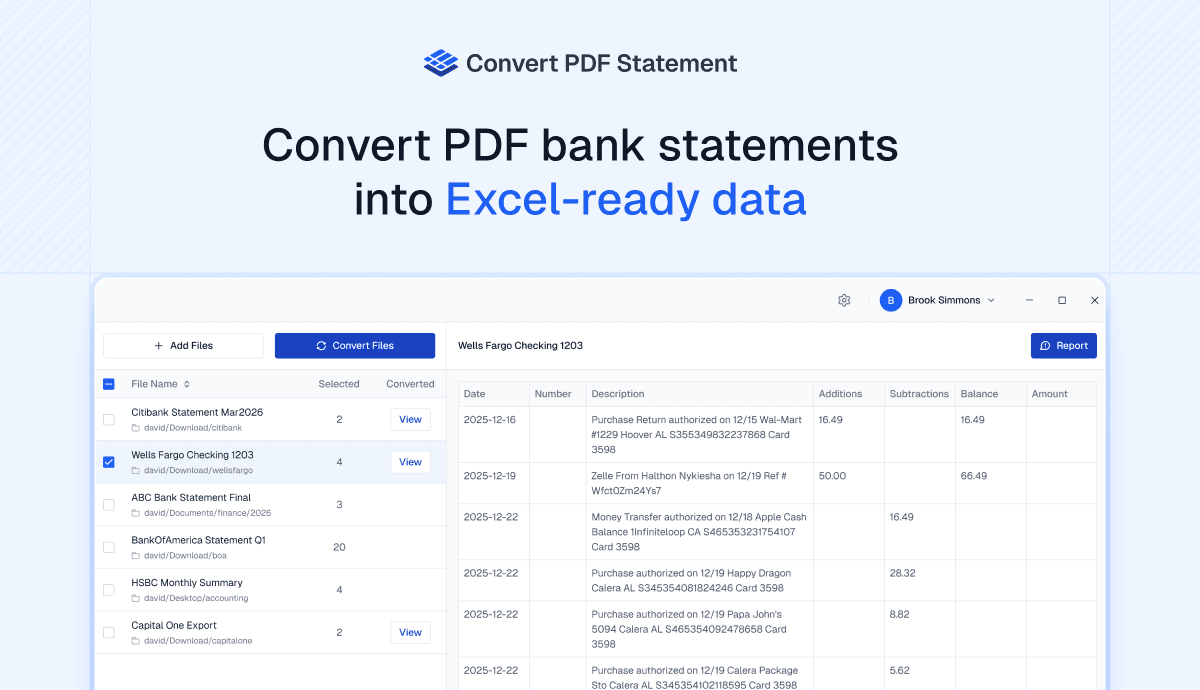
We make Convert PDF Statement, so treat this as us pointing at our own thing. It converts a PDF bank statement to CSV, with the date, description, and amount each in its own column, ready to open in Excel and import into QuickBooks or Xero. It runs on your own Windows machine, so the statement never leaves your computer, and it follows the same fixed steps every time, so the same statement gives you the same output on every run. Drop in a stack of them and it works through the batch, which is the part that matters on a cleanup.
What it replaces isn't ChatGPT. It's typing the rows by hand, an afternoon instead of a week of evenings. Try it on a real statement and see if it gets the evening back.
What it comes down to
So, can you use ChatGPT to convert a bank statement? Yes, and for a single statement that's yours, it's a fair way to do it.
The catch is everything that makes client work different. A number can come back wrong while looking completely right. The next run might not match the last one. And the file has to leave your machine to get there.
None of those matter much for a one-off. All of them matter when the rows are going into someone else's books and have to hold up.
The property worth keeping is the dull one: same input, same output, on your own machine. Whatever you use to convert a bank statement to CSV, that's the bar for client work. It's the bar manual typing has always quietly met, just slowly. The point of a tool is to keep that reliability and give you the evening back.